Author posts AJ

How to Increase Efficiency in the Workplace

How to Increase Efficiency in the WorkplaceIt is obvious, that if the employees of any business are happy, their productivity increases, and this is exactly what helps the business grow. Improving efficiency in the workplace starts from enabling employees to work smarter, not harder, as well as from maintaining and developing of such important factors as work environment, job satisfaction, effective leadership, right tools and equipment and more. The tips below will help find and implement the strategies of boosting employee engagement and increasing the efficiency of the workflow.

Delegation

Delegation may provide some risk, however it increases responsibility of employees, what is important for improving the morale. This contributes to a sense of achievement and development in their careers. Moreover, it is a perfect opportunity to identify new talents and strengths of the team.

Flexible work hours and remote work

Flexible work hours may let employees work more efficient. Also it is worth considering the possibility of making some part or the entire team remote, or offering more work from home days. “Buffer, Edgar, Zapier and Groove are among many companies that run on fully remote teams. It’s more than just a trend. According to reports, using remote teams improves workplace productivity by 13 percent,” according to Entrepreneur.

Comfortable workplace conditions

Workplace should be not just safe but also comfortable for employees. Inconvenient environment distracts from concentration, and employees will spend more time trying to improve their conditions. Ensure both heating and air-conditioning systems are in working order, the workplace is clean, all equipment and tools are in good condition and in place, lighting complies with standards, etc.

Automation of tedious activities

There are some monotonous, laborious and time consuming tasks, which may not be related to immediate work activities. For example, paperwork. This tires employees and reduces their interest in progress and in increasing the efficiency of the workflow. Try to automate such operations. There are many technologies, which significantly excelled in this direction. Special mobile apps allow businesses almost completely eliminate paperwork and work with all documentation using mobile devices. This contributes to more fast, optimized and reliable work with various data, as well as provides a positive effect on the efficiency of all operations.

Why you should turn to Snappii

Snappii is an expert in transferring to paperless business. We offer unique solutions of developing custom apps for businesses and converting existing paper documents to their digital analogue. Learn more about DIY form conversion here and try it yourself. Also, Snappii team is ready to do it for you. Send us your forms and requirements here. Need a complete custom app for your business? You can send us your requirements to discuss.

Facilities Management Data and the Best Way to Work with It

Facilities Management Data and the Best Way to Work with ItThe formal practice of facility management has been around since the 1970s. Today there are 2 types of facility maintenance workers: the facility manager and the maintenance technician. Technicians are responsible for building walkthroughs, preventive maintenance, and repairs. Among facilities managers’ duties are: maintaining safe, comfortable, and useful environments, work with building assets, exploring of their impact, strategic tasks and more. These responsibilities are constantly evolving.

Why collect facility management data?

Data is critical for facility managers to understand where the facilities management processes and procedures stand, in which direction to move to improve them and to measure these actions. In general, data and analytics set the stage to better facilities management.

The key types of data to use

While there is a huge number of data to consider, some metrics will provide more insight. Here are some of them:

– Work order response time. This is both a diagnostic data and a prescriptive one. This data contributes to avoiding delays and optimizing repair works.

– Repair cost. The data of average repair costs is useful when planning yearly facility maintenance budgets. This contributes to more rational and cost-effective use of funds.

– Energy cost. Energy is a big cost for facilities. The data of usual energy costs and usage helps optimize and save the related expenditures in facilities.

– Space occupancy. This data allows facility managers to understand existing space utilization and how to better manage the space.

The benefits of mobile apps

To make the work with data easier and more efficient, modern facility managers refer to special mobile apps. These apps allow users to collect, manage and analyze all data right on a mobile device. Among the main benefits are:

– Timely and more accurate data.

– Agility and the opportunity to work with data right in the field

– Better instant communication and the opportunity to share all data without face to face interaction

– The opportunity to generate various reports and store them with constant access.

Snappii is the top business app development company. We are ready to create a custom app for fast, simple and efficient work with any facility management data. Send us your requirements to discuss.

Moreover, Snappii offers the ready-made Building Maintenance app, which can be useful for any facility manager. This app is designed to help organize and manage maintenance inspections of buildings. Also users are able to evaluate conditions of functional areas and create building service orders. Download Building Maintenance app to try. It is available in Apple App Store and Google Play. Feel free to contact us to discuss the customization of this app.

Estimating and Quoting Software for Construction Projects

Estimating and Quoting Software for Construction ProjectsWhat estimator wouldn’t want to quote construction projects faster and easier? This way, to optimize this process, save time and money, modern estimators, contractors and other specialists implement special mobile technology for estimating and quoting.

What is construction estimating software

Construction estimating software is a pocket mobile tool, gaining immense popularity, and designed to streamline and improve the process of creating cost, material, and labor estimates for various construction projects and operations. The, estimating, quoting and bidding processes are all very closely interconnected. It’s common for some software to span all these activities. Also all estimating and quoting software provides different packages of specific features, so user should keep this in mind, when certain features are critical.

Why it is useful

Estimating and quoting apps are a real time saver. Pre-made mobile forms allow users to collect data and fill in estimation forms in a snap, anytime and anywhere. No need to fill in the forms manually, transfer documentation, adjust any form to the standard, constant maintain file storages and more. Estimating and quoting apps contribute to increased accuracy, reliability and agility. Estimating becomes a process with minimal effort and great time savings.

Construction Estimator app from Snappii

Snappii helps construction companies make their operations easier and more efficient for about 10 years. Construction Estimator app is one of our top ready-made apps, which is successfully used by different specialists. This app allows users to quickly create on-site estimates for construction and repair projects. Among the main features of the app are:

– the opportunity to import clients from the address book or Excel file;

– the opportunity to quantify material, labor and other costs and fill in the pre-made form;

– the opportunity to make necessary calculations and show a customer the total estimated cost in labor, parts, and the grand total;

– the opportunity to transform voice to text and avoid typing;

– the opportunity to preview the estimate as a PDF;

– the opportunity to share the estimate with anyone via email, Facebook, network drives and other sharing options available on device;

– the opportunity to store all the data locally on the device.

Construction Estimator app is available in Apple App Store as well as in Google Play. Snappii team is open to discuss any customization of the app to meet your specific needs. You can contact us here.

How to Make a Roof More Energy Efficient and Reduce Energy Costs

How to Make a Roof More Energy Efficient and Reduce Energy CostsSummer or winter months are usually the time of increased energy costs. The reason is more intensive use of heating and cooling systems. There are some ways to reduce energy costs in home, and energy-efficient roofing is one of them.

Adequate roof insulation

One of the ways to make a roof more energy efficient is ensuring adequate insulation. Poorly insulated attics can’t fully withstand high temperatures and force homeowners to increase energy costs. However, while improving insulation, it is important to know the optimal amount and type of insulating material that should be used.

Roof coating

Another method for increasing a roof’s energy efficiency is to add specific coating or material to the roof. Dark colors retain more heat. In its turn, there is a coating to reduce heat retention, for example special cool-roofing paint. In addition to energy efficiency, this solution contributes to increasing UV and waterproofing protection for the roof.

Energy efficient roofing materials

The following solution is suitable while roof replacement or construction of a new roof. There are special energy efficient roofing materials, which should be thought in advance. For example, metal roofing provides significant savings in energy, than shingle.

The process to start with

Considering all the variety of opportunities to increase energy efficient of roof and reduce energy costs, and keeping in mind various specific aspects of each house, homeowners should conduct roof inspection before deciding on the best strategy. The best way to make such inspection accurate, efficient, as well as fast and quite simple, is using special mobile app.

Roof Inspection app from Snappii

Snappii offers smart and multifunctional Roof Inspection app. This app is specifically designed to perform multiple types of roof inspections by using a mobile device. Roof Inspection app covers the following types of roof: asphalt shingles, clay tiles, slate, metal, wood shingles and shakes, built-up/membrane/green roof. The app users are able to collect roof inspection details in minutes right in the field, take pictures, make notes, add digital signature, generate reports and send them. This video demonstrates how Roof Inspection app works. The app is available to download in Apple App Store and Google Play. Snappii team is ready to discuss the customization of Roof Inspection app. If you have any specific requirements and you want us to implement them in the app, please send them to us.

The importance of regular roof inspections

Keep in mind, that any roof requires regular inspections regardless of the immediate problem or intention to remodel something in the roof. By making sure the roof is in good condition, you can prevent different hassles and keep safety of inhabitants.

How to Convert Your Forms with Optical Field Recognition in Snappii Mobile Forms App

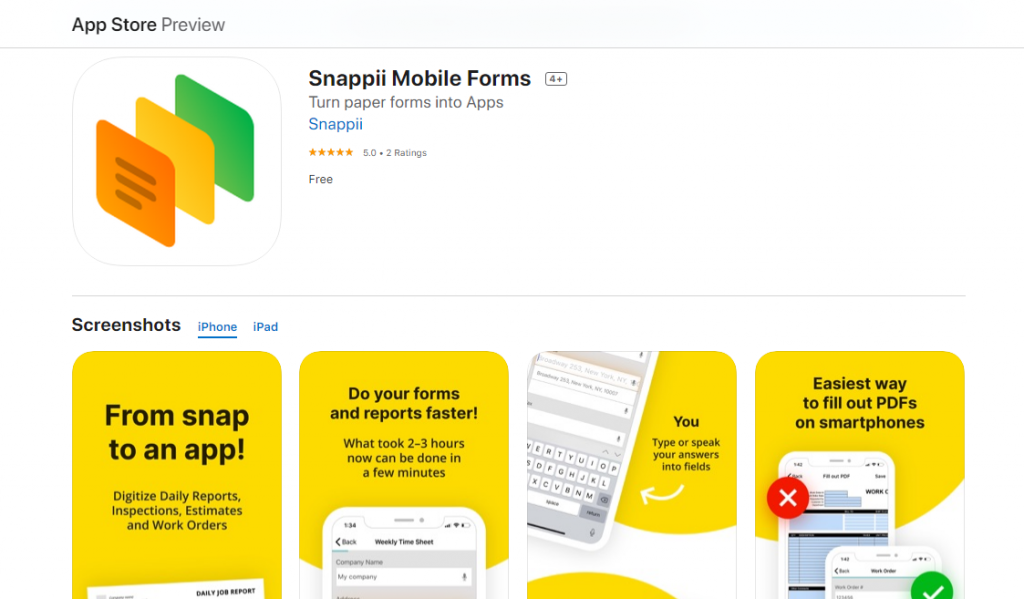
How to Convert Your Forms with Optical Field Recognition in Snappii Mobile Forms AppAny company using forms and creating PDF reports can now go digital instantly without huge investment of time and money. Anyone with mobile device can convert PDF or image file of form to its mobile analogue. Snappii offers Snappii Mobile Forms app with Optical Field Recognition. Let’s consider how it works.
The major steps of form conversion with Snappii Mobile Forms app

– First of all, download Snappii Mobile Forms app and register.

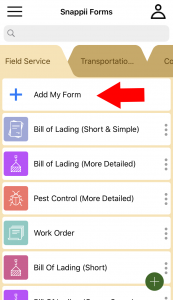
– Here is the opportunity to add your form.
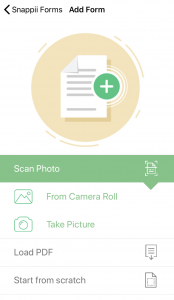
– Choose the way you do this. We will add the form photo from the camera roll.
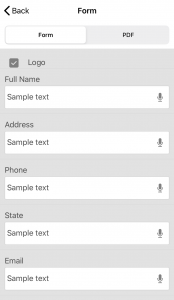
– You will get the info about recognized fields.
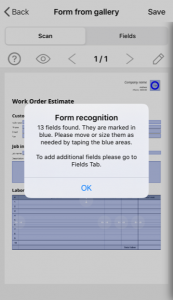
– Make necessary edits of the form report.
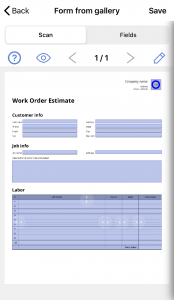
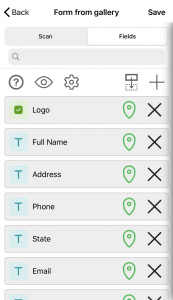
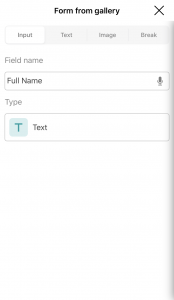
– Go to Fields to edit the form. Edit fields and add new.
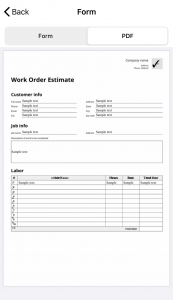
– Preview the form and the PDF report.

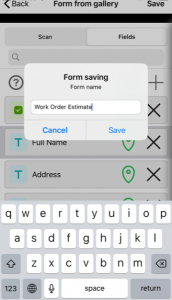
– Save the form.

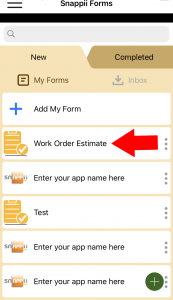
– You can start using your form.

With Snappii Mobile Forms app, you can also use one of 100+ ready-to-use form templates. They are customizable to your specific needs. Moreover, you are able to create a mobile form from scratch.

Snappii’s mobile forms provide autofilling, voice-to-text conversion, bar codes and QR codes scanning, the opportunity to take pictures and more.

The time to go digital

It’s time to replace bulky and unreliable paper documents with a smart pocket tool. Read more about the advantages of shifting from paper to mobile forms here.

If you are not ready to convert your forms yourself, Snappii team will do it for you. Send us your forms and requirements and get a free quote. We are proud of high quality of our solutions and short delivery time. Feel free to contact our support team with any questions at support@snappii.com.

The Key Steps of Form Conversion with Snappii’s Optical Field Recognition System

The Key Steps of Form Conversion with Snappii's Optical Field Recognition SystemPaper is undoubtedly outdated. It is difficult to access, costly, time-consuming, unreliable, etc. Mobile forms have become more and more important in our daily lives and in business. Most of advanced businesses in various industries have already realized that implementing mobile forms into their business processes significantly improves data quality and workflow. Nowadays Snappii allows companies of all sizes to go digital without huge effort and investment.
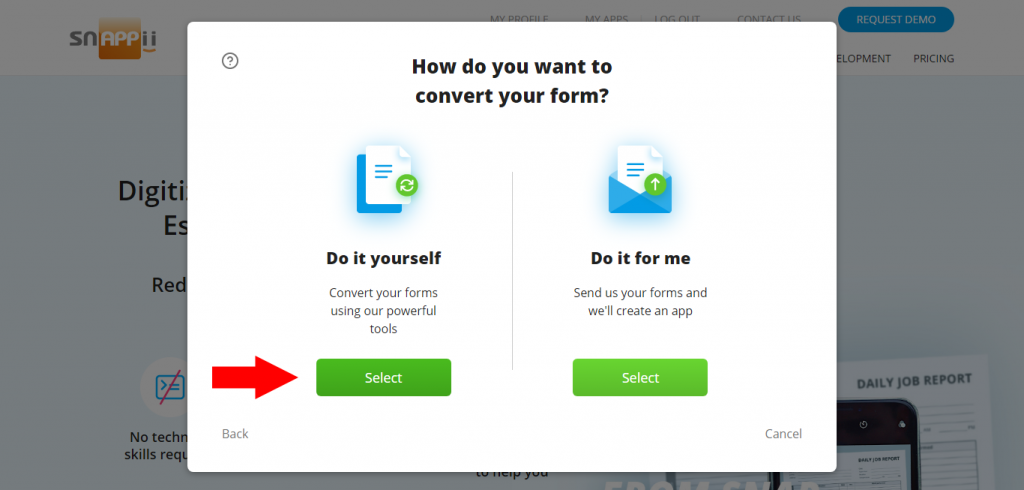
Optical Field Recognition system or the time to turn to Artificial Intelligence for mobile form creation

Most businesses already have their own forms they want to continue using. However, it takes time to create a mobile form from scratch. With Snappii’s Optical Field Recognition system, there is an opportunity to easily and quickly convert already existing forms to their mobile analogue. Here are the steps:

– Choose do it yourself option. You are able to convert your form from Apple mobile device, as well as from your computer/laptop.

– There are 3 ways to get your mobile form. We will consider the second one.
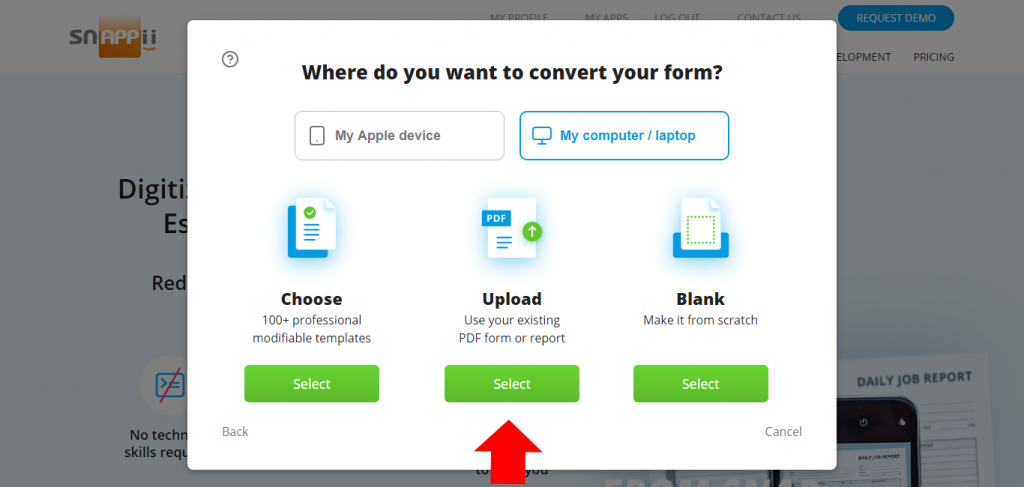
– Upload your PDF or image file. You can choose the way of creating your mobile form: Automatically (Artificial Intelligence) or Manually. Let’s choose the first one.
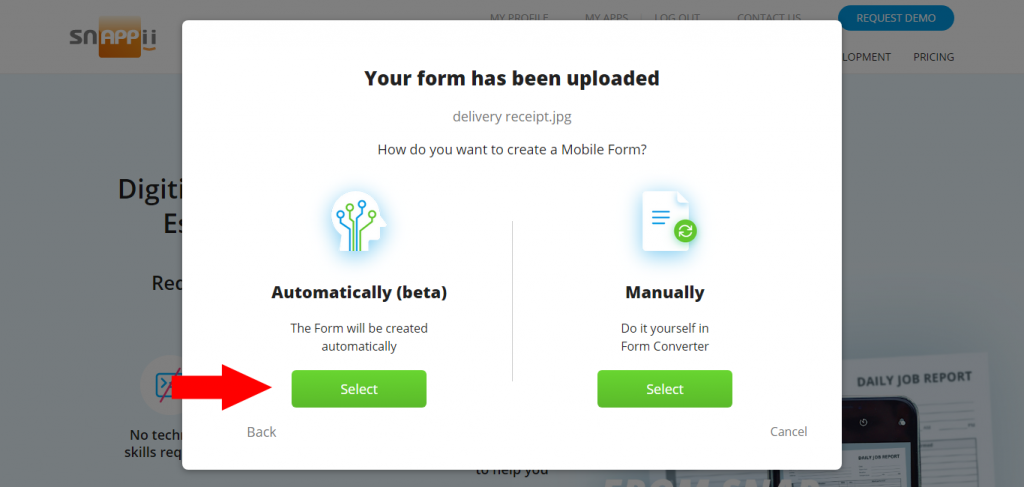
– You can edit the resulting form. Watch this video to learn how to work with Snappii Mobile Form Converter.
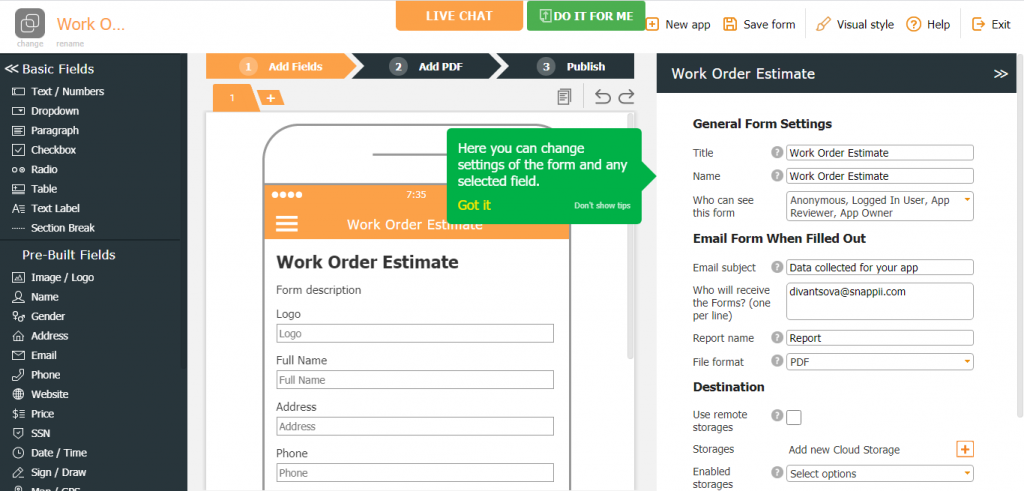
– You can also edit the PDF report of the form.
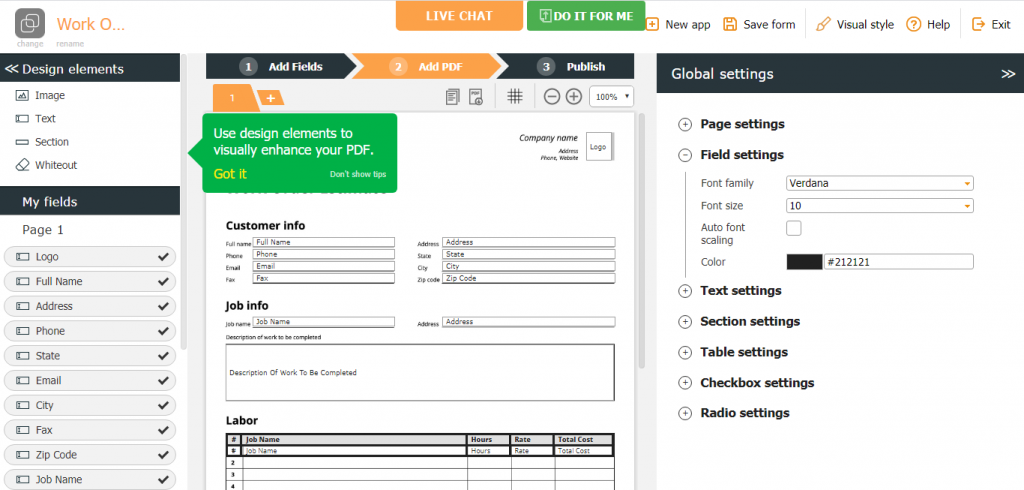
– Preview your mobile form and PDF report.
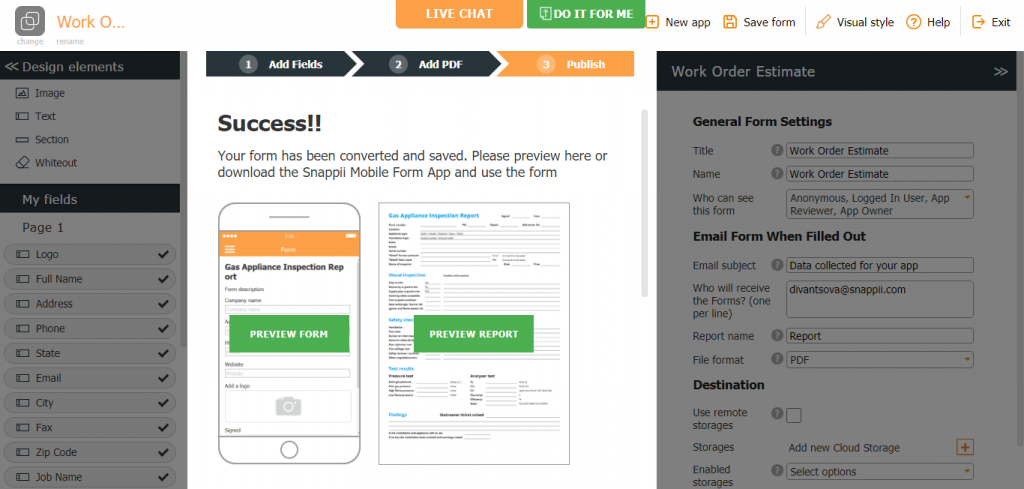
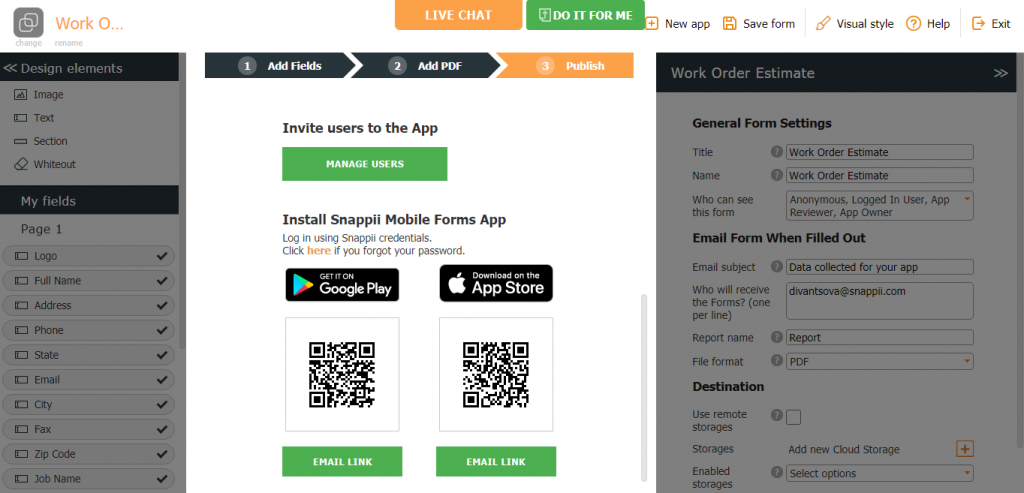
– Install Snappii Mobile Forms app to use your mobile form.

“Today we welcome all users to try our brand new Optical Field Recognition, – Alex Bakman, Snappii CEO says. “A process that used to take 2 to 3 hours to do manually, now with optical field recognition can be done in seconds. This means that any company using forms and creating PDF reports can now go digital instantly without huge investment of time and money! This is the key point that differentiates Snappii from its competition. If you are a regular user of Snappii, here’s a great opportunity to help us make the next release the best ever.”

Snappii team is always able to convert your forms for you. Send us your forms and requirements here. Contact Snappii support team at support@snappii.com with any questions.

What You Should Know about Eye Safety Equipment for Welding

What You Should Know about Eye Safety Equipment for WeldingWelding operations present several hazards to both those undertaking the activity and others in the environment. This may be associated with harmful bright light, burns from molten metals, etc. Therefore, it’s important that both the employers and employees are aware of the risks and hazards welding poses, and understand what precautions they can take to prevent accidents.

The importance of eye protection

Eye injury is the most common type of injury, and sometimes it can even results in blindness. It may occur from radiation, intense light produced by a welding arc, sparks, hot slag and other flying particles. This way, all welders should know and follow the best safety practices related to eye protection during welding.

Basic Eye Safety Equipment

Lack of personal protective equipment (PPE) is the leading cause of injuries. Eye protection equipment usually includes safety goggles, safety glasses, welding helmets and face shields. The equipment must always be appropriate for the type of welding.

Safety glasses

Safety glasses is an important safety measure and should always be under a welding helmet in every welding work. There are different levels of protection, which depend on the type of welding. The glasses should have side shields to provide full protection to both the front and sides of the eyes. There are special tests the safety glasses must pass before they are certified for use.

Safety goggles

Safety welding goggles are more advanced than safety glasses. They provide high protection of impact, particle and welding light. Safety welding goggles also have shade level like safety glasses. Safety goggles have special venting. It way be direct or indirect. Goggles with direct venting come with a mesh of small holes on the sides. This helps reduce fogging. If prevention of fogging is not a priority, there is an indirect venting, using in protection from high dust and splash.

Welding helmets

A welding helmet protects the skin and eyes from severe sparks, as well as from vision-damaging infrared and UV rays emitted by the arc. Welding helmets usually should be worn over welding goggles or safety glasses. Also they should have a filter shade that is suitable for the type of welding. There are helmets with a fixed shade which remains darkened at all times. Moreover, there are auto-darkening helmets, which automatically change the shade when a welding arc is initiated.

Face shields

Face shields are used to protect a welder’s face in addition to the eyes, offering even higher impact protection. There are filters in face shields for additional protection from sparks and debris.

In addition to using the protective equipment above, it is important to control established rules of conduct, regular inspect welding equipment, check and maintain fire-fighting equipment and conduct regular safety trainings.

Snappii’s safety mobile solutions

Snappii can become your assistant in providing safety at the workplace. We offer powerful apps for various safety inspections. For example, a ready-made Welding Environment Inspection app. Make sure that welders adhere to safety guidelines and keep workplace safety with the convenience of your mobile device. Learn more about the app and download it to try. Find more safety apps here. Most of them are customizable. If you are interested in creating your own app, Snappii team is able to provide its excellent service. We create complete custom business apps in weeks. All your requirements will be met. Contact us here to discuss this.

The Time to Increase E-commerce Warehousing Efficiency

The Time to Increase E-commerce Warehousing EfficiencyThere is nothing quite like the ease and convenience of ordering things online, especially in this unstable time of COVID-19 pandemic. As e-commerce continues to grow in a rapid rate, it is increasingly important for companies to increase the efficiency of their e-commerce warehousing for stable and organized operations.

Organized inventory and picking routes

Time is money, and to make e-commerce warehouse operations efficient, companies should optimize and minimize the time it takes to pick orders. The inventory should be organized in ways that make picking routes as short as possible. Among the useful actions to reach this is placing of top-selling within easy reach, and placing the rest of items according to the frequency with which they’re ordered. This requires constant compliance and clear monitoring. The other useful point is locating items that are often ordered together next to each other. Also companies should always accommodate seasonal demand and special promotions.

Mobile solutions to streamline usual operations

Technological innovation is one of the best ways to improve warehouse management process and the entire warehouse operation. When it comes to increasing e-commerce warehousing efficiency, purchasing expensive robots and unique technologies is not necessary. Instead, companies can start with smart mobile apps. They can help optimize usual operations, maintain constant control and manage all the data. With the wide array of warehouse mobile solutions available today, there is an app that fits the needs and budget of any company.

Join successful Snappii apps holders

Snappii is a leader in multifunctional business apps. We cover such industries as construction, field service, fleet maintenance and management, and warehousing is also among them. Snappii offers ready-made apps to increase the level of warehouse management and improve other related operations. Download and try the apps here. Moreover, Snappii team is able to embody your individual idea. We are able to create a custom business app from scratch and in accordance with your specific requirements. Snappii is proud of the quality and high speed of its work. Contact us to discuss the development of your own custom business app.

Pros and Cons of Cross-Platform Apps

Pros and Cons of Cross-Platform AppsThe app development market is expected to grow by leaps and bounds, potentially becoming a 6.3 trillion dollar economy by 2021. Today business app developers focus on cross-platform mobile app development, and try to understand whether this will be the right and beneficial solution for companies. Native apps are usually fast and high performing. However for some businesses, developing several apps of different platforms for the same purpose is time-consuming, expensive and does not seem like efficient strategy. Cross-platform apps become a more reasonable choice for them in this context. Here are some pros and cons of choosing cross-platform app development.

Pros

Lower development costs

Businesses pay for a native app development. And further this cost will multiply for every native platform the app is coded for. With cross-platform apps, there is a single code for multiple platforms and it is reusable. This contributes to relatively lower costs during development.

Faster delivery to the market

In cross-platform apps changes have to be coded only once. All updates can be deployed and synced across every device at the same time. This contributes to faster delivery of different modifications to the market.

Wider reach of the audience

With cross-platform apps you can contact iOS and Android users at the same time. This will allow you to capture a larger share of the market faster, build a user base in a short time and see a more complete picture of business development.

Better Cloud integration

Cross-platform apps can be easily integrated with cloud settings. Only one source code needs to be coordinated. This enhances a compatibility with any plugins and extensions.

Cons

More time for code maintenance

Most of apps should be updated each time any OS is updated to keep compatibility. Also, after the update, the compatibility should be tested with all the platforms the app is running on. This requires some time.

Low flexibility

While coding for multiple platforms, developers invariably lose access to certain features of the OS, API’s and the device. Certain features of all platforms should be dropped out to provide features that are supported on every device. Full integration and flexibility are sacrificed.

Restrictions in graphics

When it comes to heavily graphic reliant apps, cross-platform apps may be not the best solution. Developers may face severe restrictions on the 3D graphics or complex graphical user interfaces. Apps may not have access to core graphics libraries, and it will have an impact on performance.

Security concerns

Cross-platform apps can be vulnerable to threats that affect different platforms in different ways. Also, all cross-platform apps that deal with user or corporate data have to be compliant to security features for all the platforms it runs on. This is not an easy task.

Considering app development for your business? Snappii can become your leader in this process. We create powerful business apps for a plenty of industries for about 10 year. Our customers appreciate us for the highest standards, rapid and cost effective work, agility, excellent support and high quality of service. Snappii has helped hundreds of companies. Contact us to learn more and discuss your requirements.


Meet the Rapidly Changing COVID-19 Situation and Ensure Safety of Your Business

Meet the Rapidly Changing COVID-19 Situation and Ensure Safety of Your BusinessWith the COVID-19 situation, the number of different inspections and checks done by businesses steadily rises. This is essential to ensure safety of employees and keep business afloat. Since safety maintenance and managing healthcare risks are now such a central focus, it is important to stay cool, calm, concentrated and agile in the midst of changing guidance.

The benefits of moving to mobile inspection forms

Today, various hygiene and healthcare checks are mandatory in most businesses. They are held on a daily basis, and the results should always be at hand. The best way of such inspections is using mobile inspection forms and checklists. They allow employees to stop drowning in paperwork and optimize all the data. Pre-made mobile inspection forms significantly reduce inspection time and prevent the workflow from slowing down due to the new mandatory operations.

Staying on top of new guidelines and recommendations

As the virus unfolds and new data comes, more new guidelines and recommendations are issued. Apps with mobile inspection forms allow businesses not to miss them and instantly add them to the points of regular control. This contributes to increased compliance, accuracy and reliability, and helps better preserve health of employees, as well as the well-being of the business.

Mobile solutions from Snappii

Ensure safety of your team and keep your business open with Snappii. We offer affordable and fast form conversion and creation. You can convert your existing inspection forms and checklists to their digital analogue. Thanks to the new Optical Field Recognition system, your paper forms are automatically converted to mobile apps in seconds. No technical skills required. Download free ready-made Snappii Mobile Forms app to use your mobile forms. Find more information here and try it free. Also, Snappii team can do it for you. Just send us your forms and requirements. We will meet your specific needs and provide a finished product in the shortest possible time.

How Mobile Solutions Benefit Facility Management

How Mobile Solutions Benefit Facility ManagementToday’s facility manager is under pressure to keep everything under control. Complying with strict regulatory standards, regular inspections, maintaining assets and more are among the major duties. The facility manager who relies on outdated manual processes of operations with data is not equipped to succeed in this field and maintain a high level of service quality. Here are a few ways that modern mobile solutions can help overcome challenges of facility management and elevate service quality.

Data accuracy

Data accuracy is a key. All data needs to be correctly captured, processed and managed, and mobile solutions allow managers to simplify and optimize these processes. This contributes to ability to respond immediately and by the best way to customers or regulatory authorities.

Optimized inspections

Mobile solutions streamline the facility inspection process. They allow users to perform high quality inspections right in the field. No more tedious paperwork required. There is an opportunity to instantly generate complete reports and share them with any specialists.

Improved communication

There are always team members who work remotely, and communicating efficiently through traditional methods can get a tricky. Using mobile solutions, managers can contact any employee anytime and anywhere. Also it is even possible for different members of a team to efficiently work and collaborate on the one project remotely.

Increased safety and security of assets

It is extremely important to keep all the assets within the organization safe and secure. Trying to achieve this manually is not is not reliable and is prone to human mistakes. Using mobile facility maintenance solutions, managers have the ability to track their assets in real time and always keep them on hand. The increased control over the assets ensures that they are safe at all times.

High quality mobile solutions from Snappii

If you are ready to move to mobile solutions to improve facility management, Snappii is ready to help you. We create powerful, multifunctional business apps for various industries and fields of activity. Read the testimonials of our customers here. We hold every business app we make to the highest standard. Snappii services are available for businesses of different sizes. Let us know your requirements and avail the enormous benefits of using a well-designed business app.

The Tips to Find and Hire the Right Business App Developer

The Tips to Find and Hire the Right Business App DeveloperMobile business apps are a significant advantage for any company. There are a plenty of tasks to be monitored while doing a business. Having an app means you can provide your employees with a digital experience to optimize and accelerate usual operations, as well as get an overview and a complete control over the entire workflow.

An acute question

If the question of necessity and benefits of mobile business apps has already been resolved for everyone, then the question of finding a qualified app developer is very acute. According to Evans Data Corporation, there are 23 million people working as desktop, web, and mobile app developers worldwide. If you just pick one of them without putting too much thought into it, you may lost money and even harm your business. Here are few tips on how to find and hire the right app developer.

Where to start

There is one major question you should ask to yourself: what specific business challenge would I like to solve? This is the starting point, which everyone should always keep in mind.

There are three ways that you can go about when hiring an app developer:

– in-house team,

– freelancer,

– outsourcing team.

The choice of the way depends on the resources of your business, time and financial component.

The best approach

App developers come in different skill level and expertise. It’s hard to determine a suitable one just by the resume in the Internet. Search by the experience of previous customers. Ask them for any comments. However, you still should examine the developer’s portfolio and look into the culture of the company. Such method can save a significant amount of time, and it is more reliable. Also there are special platforms and service with the lists of developers and their level according to different criteria. For example, Clutch, Capterra, Goodfirms and more.

Before hiring an app developer, make sure and discuss constant transparent communication. Developers should be upfront with their capabilities, limitations and unforeseen moments.

The choice is obvious

If you are looking for mobile business app developer, Snappii is a strong leader in this field for about 10 years. We offer lightning fast codeless app development in days, not months, from idea to delivery. We cover a plenty of industries and fields of activity. Snappii combines the highest standard, availability and agility. Contact us to discuss your needs and start our successful collaboration.


How do you want to build your App?
Choose a ready-made app template for my business and customize it in WYSIWYG Editor
video tutorial
Video tutorial
From scratch using WYSIWYG Editor
video tutorial
Video tutorial
Open my apps

First name

Last name

Job title

Company

Company size

Phone

Email

Password

agree-license
I read and agree with the Terms of Service

Email

Password

Forgot password